Introduction
This repository contains a collection of Jupyter Notebooks that demonstrate how to use the Responsible AI Toolbox to build Responsible AI solutions.
- Notebooks here are reproduced from the Responsible AI Toolnox: Notebook Tutorials for learning purposes only.
- Read this May 2022 Technical Community Blog Post for a comprehensive overview of the Responsible AI Toolbox.
1. What is Responsible AI?
Responsible Artificial Intelligence (Responsible AI) is an approach to developing, assessing, and deploying AI systems in a safe, trustworthy, and ethical way.
Microsoft has developed a Responsible AI Standard (Jun 2022). It's a framework for building AI systems according to six principles: fairness, reliability and safety, privacy and security, inclusiveness, transparency, and accountability.
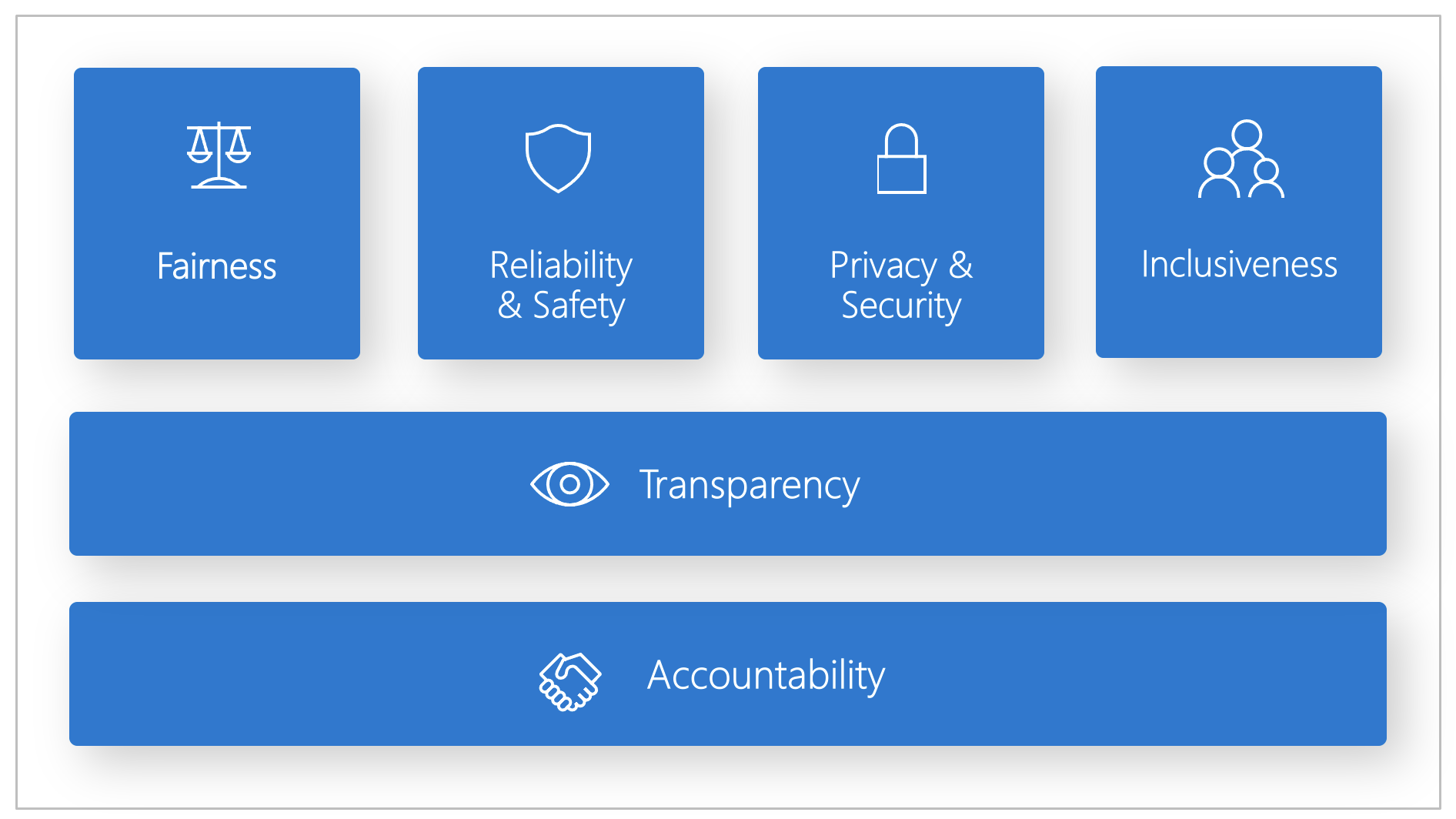
The principles are summarized briefly below, with links to relevant documentation and "assessment" components from the toolbox that help validate compliance.
| Principle | Description | Assessment |
|---|---|---|
| Fairness and Inclusiveness | AI systems should treat everyone fairly and avoid affecting similarly situated groups of people in different ways. Ex: All loan applicants with similar backgrounds should get the same recommendations or outcomes. | RAI Dashboard - Fairness Assessment |
| Reliability and Safety | To build trust, it's critical that AI systems operate as they were originally designed, respond safely to unanticipated conditions, and resist harmful manipulation. | RAI Dashboard - Error Analysis |
| Transparency | When AI systems influence decisions that impact people's lives, it's critical that people understand how those decisions were made. A crucial part of transparency is interpretability: the useful explanation of the behavior of AI systems and their components | RAI Dashboard - Interpretability RAI Dashboard - Counterfacutal What-If |
| Privacy and Security | With AI, privacy and data security require close attention because access to data is essential for AI systems to make accurate and informed predictions and decisions about people. AI systems must comply with privacy laws on data usage transparency & consumer control over usage. | Azure ML Governance support SmartNoise OSS to build differential privacy solutions Counterfit OSS cyberattack simulator |
| Inclusiveness | AI systems should be inclusive and accessible. | |
| Accountability | AI systems should be accountable. | |
2. What is the Responsible AI Toolbox?
It's an open-source project that provides tools and guidance to help AI practitioners apply responsible AI principles and practices to their work with components and dashboards to help them design and assess their models and decision-making workflows for compliance.
The core of the toolbox is the Responsible AI Dashboard that is a single pane of glass to help you flow through the different stages of model development & debugging to decision-making & deployment. In this context, "single pane of glass" means a unified display that integrates and displays information from multiple sources in a single view, for convenience and context.

You can use this toolkit to understand your model's behavior, identify and mitigate bias, and explain your model's predictions. You can also use it to perturb model predictions for individual instances, and use that to gain better insight into responsible AI compliance.
The Responsible AI Dashboard integrates several open-source toolkits into a unified platform for developers and data scientists.
| Toolkit | Description |
|---|---|
| Fairness Assessment with Fairlearn | identifies cohorts of data with higher error rate than the overall benchmark |
| Error Analysis with Error Analysis Tool | identifies which groups may be disproportionately negatively impacted by AI & how. |
| Interpretability with InterpretML | _explains blackbox models, helping users understand the reasons behind predictions. |
| Counterfactual Analysis with DiCE | shows if/how feature-perturbed versions of same data give different prediction |
| Causal Analysis with EconML | focuses on answering What If-style questions to apply data-driven decision-making |
| Data Balance with Responsible AI | helps users gain an overall understanding of their data, visualize feature distribution |
3. Responsible AI Dashboard Components
The toolbox consists of 4 core dashboards as shown below:
3.1 Error Analysis Dashboard
The Error Explorer Dashboard lets you identify cohors with higher error rates, and diagnose root causes behind these errors. Once you load this dashboard, you can explore your model in 2 stages:
- Identification of errors - using the decision tree ("Treemap") or the distribution ("Heatmap") view.
- Diagnosis of errors - by saving cohorts of interest, then exploring them in more detail (e.g., dataset stats & feature distributions) or conducting what-if experiments (perturbation exploration).

3.2 Explanation Dashboard
This is the interface for Interpret-Community which provides SDK and notebooks with intepretabilty utility functions and techniques developed by the community at large.
Use this dashboard to evaluate your model, explore your dataset statistics, understanding your model's explanations for various demographics, and debug models by trying perturbations (what-if analysis) to gain insights into your model's behavior.

The explanation dashboard has 4 tabs as shown:
- Model performance tab - helps observe performance of your model across different cohorts
- Dataset explorer - helps explore dataset by slicing it up by different dimensions for comparisons.
- Aggregate feature importance (global explanation) - helps understand which features are most important for your model's predictions (and how feature impacts predictions).
- Individual feature importance and what-if (local explanation) - helps understand how feature values impact predictions for an individual instance.
3.3 Fairness Dashboard
The Fairness dashboard enables you to use common fairness metrics to assess which groups of people may be negatively impacted by your machine learning model's prediction (females vs. males vs. non-binary gender). You can then use Fairlearn's state-of-the-art unfairness mitigation algorithms to mitigate fairness issues in your classification and regression models.

3.4 Responsible AI Dashboard
The Responsible AI Dashboard is the unified pane of glass that empowers users to design tailored, end-to-end model debugging and decision-making workflows that address their particular needs.
It's key strength lies in customizability you put together subsets of components in a way that helps you analyze your model's behavior for different scenarios, in different ways.
- Below are some examples of use case and workflow thinking - see this document for the full list.
| I want to ... | RAI Dashboard Flow |
|---|---|
| understand model errors & diagnose them | Model Overview ➡️ Error Analysis ➡️ Data Explorer |
| understand model fairness issues & diagnost them | Model Overview ➡️ Fairness Assessment ➡️ Data Explorer |
| address customer questions about what they can do differently next time to get a different outcome from AI | Data Explorer ➡️ Counterfactuals Analysis and What-If |
4. Responsible AI Dashboard Usage
The Responsible AI Toolbox exists as an open-source project driven by Microsoft Research, and usable as a Python package for research and learning purposes.
However, usage by enterprise customers requires both a seamless integration into their end-to-end workflows, and support for features that are critical to regulatory and business processes. With that in mind, here are the two "flavors" of Responsible AI Dashboard today.
4.1 The OSS raiwidgets Python Package
If you are looking to understand the core concepts, and explore the capabilities of the Responsible AI Toolbox, you can use the Responsible AI Notebook Tutorials listed below.
These use the raiwidgets Python package (currently v0.32.1 - released Dec 6, 2023) - which contains the core widgets used for interactive visualizations to assess fairness, explain models, generate counterfactual examples, analyze causal effects and analyze errors in Machine Learning models.
This is an open-source option for interactively visualizing the dashboard components with your data sets and models, in your local development environment. It's a good way to get familiar with the concepts, and explore the various capabilities and features interactively - in an environment like GitHub Codespaces, for convenience.
4.2 The Azure ML Responsible AI Dashboard
While the Responsible AI Toolbox exists as an open-source project, it is also integrated into the Azure Machine Learning Service as of Nov 2022, to simplify integration and usage with cloud-deployed models. Using this integration, you can now generate Responsible AI Dashboards for your models using:
- Azure Machine Learning Studio - no code option
- Azure Machine Learning Python SDK - code-first option
- Azure Machine Learning CLI - commandline option
These are the key tools accessible via the Responsible AI Dashboard in the Azure Machine Learning service:
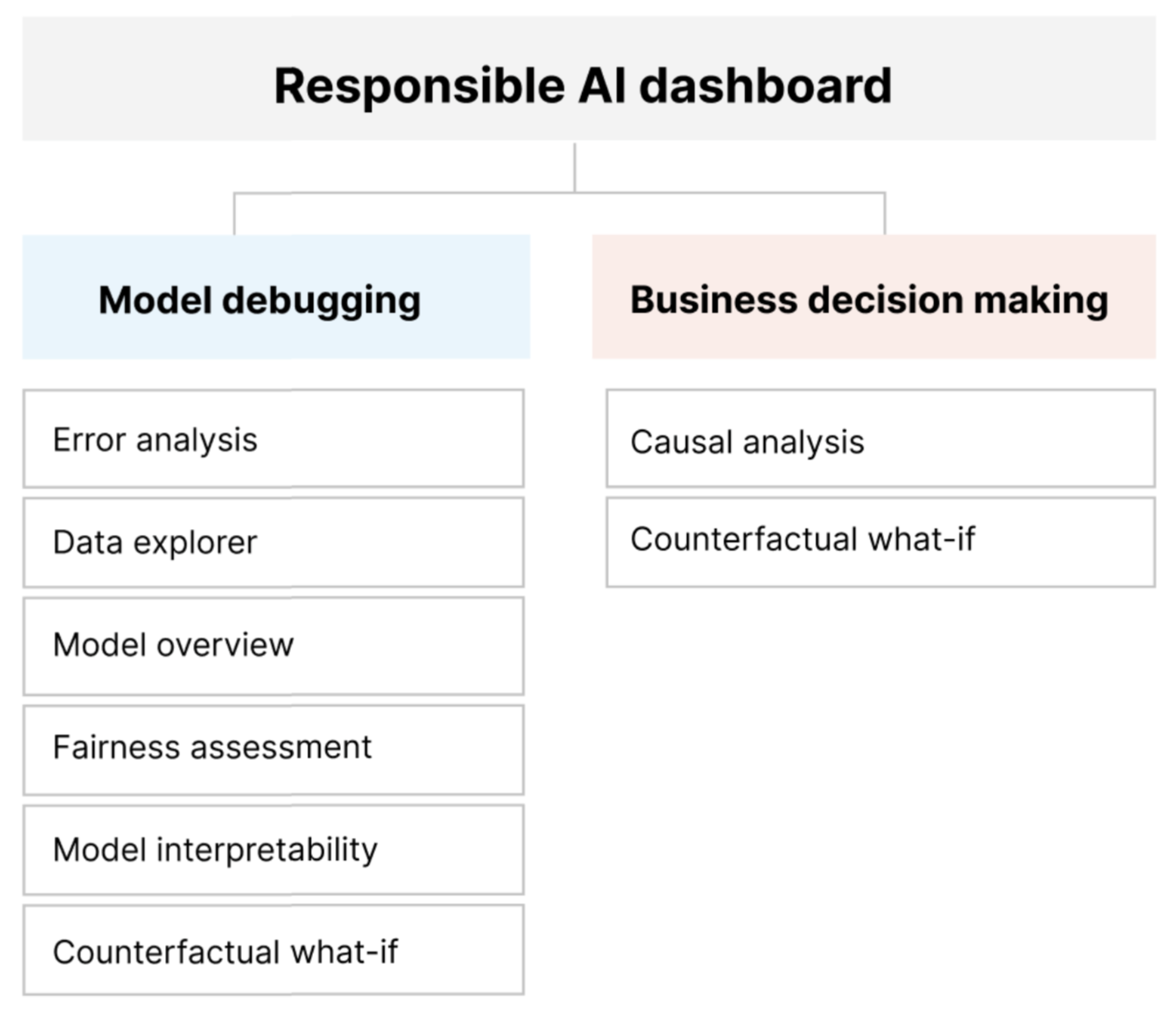
And while the initial examples focused on tabular data that is available in a tabular format (e.g., CSV, Parquet, etc.) we can also use the Responsible AI Dashboard (on Azure ML) to assess the performance, fairness and explainability of computer vision and natural language processing models.
- Generate Responsible AI Vision Insights - for computer vision models (image classification, object detection, etc.)
- Generate Responsible AI Text Insights - for NLP models (multi-label text classification, etc.)
The Azure ML integration also supports the ability to generate Responsible AI Scorecards which are critical to regulatory and business processes that enterprise customers need to comply with. The Responsible AI Scorecard lets ML professionals generate and share their data and model health records with stakeholders to earn trust or for auditing purposes.
- Generate a Responsible AI Scorecard using the SDK/CLI
- Generate a Responsible AI Scorecard using the UI
Want to explore these features further? Check out the Azure Machine Learning Responsible AI Dashboard & Scorecard repo for a list of Notebooks-based tutorials. You will need an active Azure account (and subscription) to do so.
4. Responsible AI Dashboard Notebooks
We can structure our learning journey with Jupyter Notebooks into 3 phases:
- Introduction - Notebooks that explain the concepts and capabilities of the Responsible AI Toolbox without necessarily running any code snippets.
- RAI Toolbox - Notebooks that demonstrate how to use the Responsible AI Toolbox with the
raiwidgetsPython package in Jupyter Notebooks, on GitHub Codesapces. - Azure ML - Notebooks that demonstrate how to use the Responsible AI Toolbox with the Azure ML Service - using the Studio UI, Python SDK and/or CLI.
In the table below, the "Type" of notebook defines the kind of data and model being analyzed:
- Tabular = CSV or Parquet datasets
- Vision = Image classification or object detection models
- Text = Text classification or NLP models
| Notebook | Type | Description |
|---|---|---|
| Introduction | ||
| Responsible AI Toolbox | - | Tour of the RAI Toolbox as documentation (no code) |
| Getting Started | - | Explains high-level APIs and workflows (setup validation) |
| RAI Toolbox | ||
| Census Classification Model Debugging | Tabular | |
| Diabetes Decision Making | Tabular | |
| Diabetes Regression Model Debugging | Tabular | |
| Housing Classification Model | Tabular | |
| Housing Decision Making | Tabular | |
| Multiclass DNN Model Debugging | Tabular | |
| Orange Juice Forecasting | Tabular | |
| Hugging Face BLBooks Genre Text Classification | Text | |
| Covid Event Multilabel Text Classification Model Debugging | Text | |
| DBPedia Text Classification Model Debugging | Text | |
| OpenAI Model Debugging | Text | |
| Question-Answering Model Debugging | Text | |
| Fridge Image Classification Model Debugging | Vision | |
| Fridge Multi-label Image Classification Model Debugging) | Vision | |
| Fridge Object Detection Model Debugging | Vision | |
| Cognitive Services: Speech-to-Text Fairness Testing | Cognitive Services | |
| Cognitive Services: Face Verification Fairness Testing | Cognitive Services | |
| Azure ML | ||
| Diabetes Regression Model Debugging | Tabular | sklearn dataset |
| Programmer Regression Model Debugging | Tabular | Programmers MLTable dataset |
| Finance Loan Classification | Tabular | Finance Story dataset |
| Covid Healthcare Classification | Tabular | Healthcare Story dataset |